SHOPIFY
CAPABILITY REPORT
SHOPIFY SIDEKICK AUDIT · ONE CAPTURED WORKFLOW · AUGUST 2026
BEST-SUPPORTED MODE
Prepare
Sidekick drafts; merchant saves
CAPTURED WORKFLOW
1m 33s
Prompt to Shopify confirmation
SIDEKICK’S OWN LIST
44
Tasks across eight domains
LIVE WORKFLOW
1 complete
Goal to Shopify confirmation
HOW THE WORK MOVES
WHO ACTS
Builds the draft
Merchant approves
Explains options
Sensitive actions stay human
01 · CAPTURED WORKFLOW
The strongest proof is the sequence itself. Sidekick took a one-sentence brief to a complete product record, while the merchant kept the final Save.
THE BRIEF
“Let’s sell an audit for agent readiness.” That was the full prompt.
WHAT HAPPENED
Sidekick prepared a complete Shopify product.
It populated the title, description, product type, category, tags, SEO, digital delivery, and a $147 price. After the merchant approved the final Save, Shopify showed the product as created.
ONE-SENTENCE BRIEF
MERCHANT SAVED
SHOPIFY CONFIRMED
CAPTURED SEQUENCE
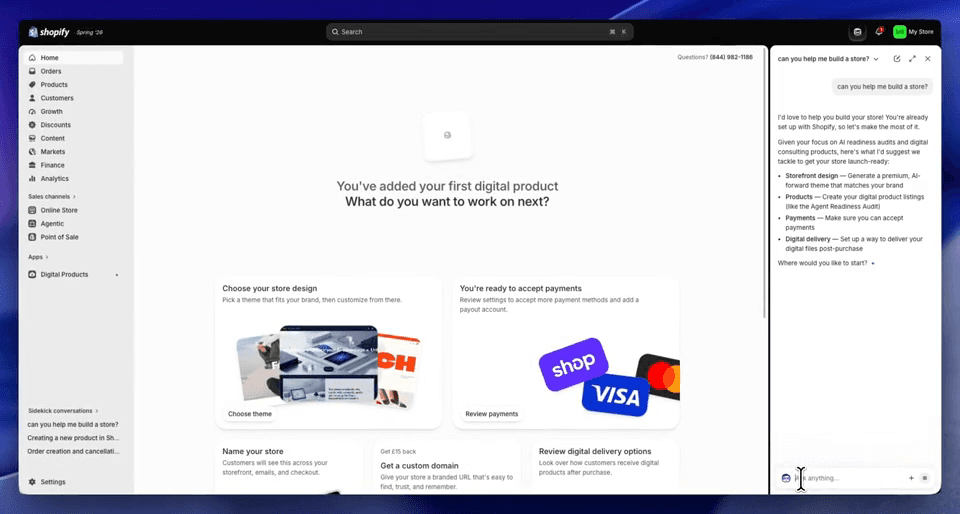
Sidekick starts with an open-ended goal, turns it into concrete choices, asks for the one detail it needs, then prepares the product for merchant approval.
01 · GOAL
Sidekick scopes the work
It turns ‘help me build a store’ into concrete next steps: storefront, products, payments, and delivery.

02 · ONE INPUT
It asks for one detail
After the merchant chooses a product listing, Sidekick asks only for the product name.

03 · PREPARED
It builds the full product
Title, description, product type, tags, SEO, shipping, inventory, and draft status are populated in Shopify.

04 · CONFIRMED
Shopify confirms the result
After the merchant saves, Shopify shows the product as added and the draft product page is visible in the host UI.
HOW TO READ THE PROFILE
RECOMMEND
Sidekick explains
Recommends data, options, and next steps.
PREPARE
Sidekick builds the draft
Populates the merchant’s work before anything changes.
FINAL WRITE
Merchant saves
The merchant retained the final Save in the captured product workflow.
SENSITIVE ACTIONS
Merchant acts
For cancellation, refunds, and fulfillment, Sidekick says it explains the options but leaves the action to the merchant.
These are action boundaries, not scores.
COMMERCE WORKFLOWS
Products, discounts, collections, storefronts, and order resolution are the capability cluster to win because the outcome is visible inside Shopify.
01
Create a product
WHAT SIDEKICK CAN DO
Turn a short brief into a complete Shopify product, including title, description, price, tags, SEO, delivery settings, and draft status.
02
Create a discount
WHAT SIDEKICK CAN DO
Prepare a discount with value, products, eligibility, minimum spend, limits, and dates, then create it after merchant confirmation.
03
Build a collection
WHAT SIDEKICK CAN DO
Choose products, ordering rules, and SEO, then build the collection after confirmation.
04
Resolve an order issue
WHAT SIDEKICK CAN DO
Explain cancellation, refund, fulfillment, and restock options, then route the consequential action to the merchant.
05
Design the storefront
WHAT SIDEKICK CAN DO
Turn a brand and URL into a generated storefront design, ready for merchant review before publish.
YOUR PRODUCT, NEXT
Bring the commerce workflow customers are already trying to finish. We’ll map what the AI can do, where approval matters, and how to make the capability obvious.
CAPABILITY MAP
✓ What the AI can finish
✓ Where approval is required
✓ What stays with the user
✓ The proof worth publishing